What are VAS Services in Pakistan and How to Cancel Unwanted Top Up Charges
What are VAS Services in Pakistan and How to Cancel Unwanted Top Up Charges
Sometimes you may notice you are being charged for mobile top up. This may be because you have subscribed to a Value Added Service (VAS) and it is charging you automatically.
The Pakistan Telecommunication Authority have processes in place to help mobile users view their subscriptions and cancel any unwanted charges. All networks have a code you can enter to view your subscriptions.
You can avoid any unwanted charges by understanding what a VAS is and how to cancel.
What are VAS Services?
Value Added Services (VAS) are extra services offered by your mobile provider.
These can include entertainment, information and alerts. Some can be useful but some can add regular charges.
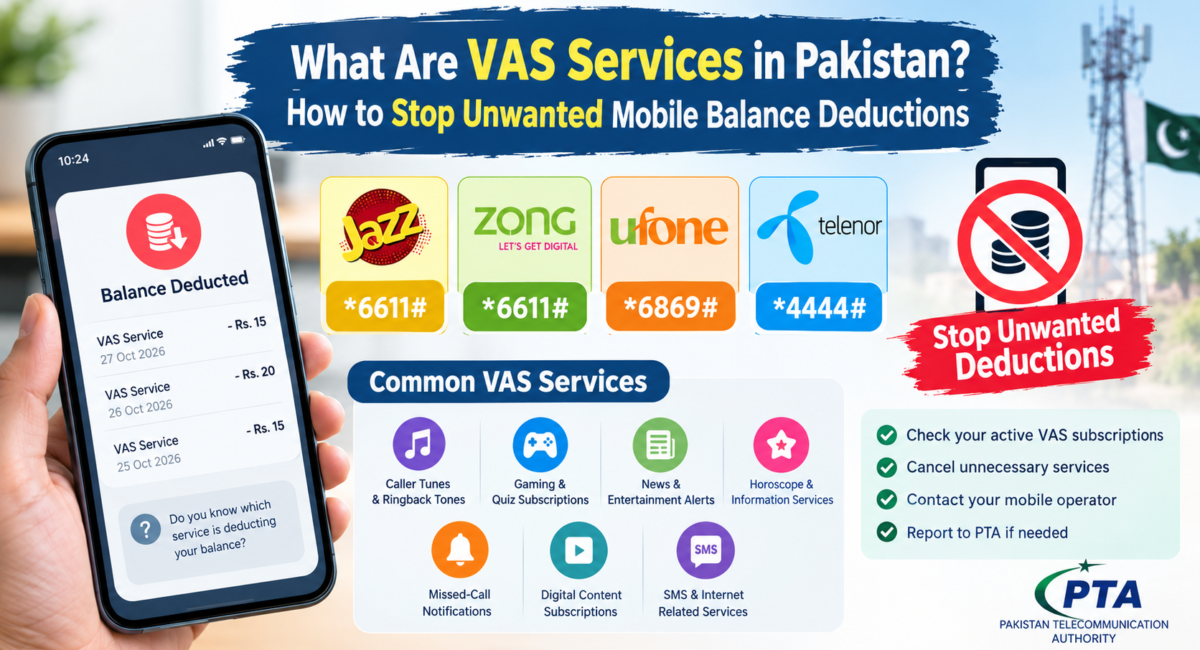
Popular VAS services include:
- Caller tunes/RBT
- Game/Quiz subscriptions
- Daily News & Entertainment Alerts
- Horoscope/Information
- Missed Call Alerts
- Digital subscriptions
- SMS & Internet
Depending on the service you will automatically be charged. The PTA have seen complaints regarding unwanted VAS services.
How to Cancel Unwanted Mobile Top Up in Pakistan
Enter the correct USSD Code for your network.
Jazz
- Open your dial pad.
- Enter *6611# with your Jazz SIM.
- You will then be prompted.
- View your subscriptions.
- Select the correct options to cancel any unwanted subscriptions.
- You can also download the official SIMOSA app or speak to customer services.
Zong
- Open your dial pad.
- Enter *6611# with your Zong number.
- You will then be prompted.
- View your active VAS subscriptions.
- Cancel any subscriptions you no longer want.
If you are unsure what subscription you are being charged for please contact Zong customer services.
Ufone
Enter *6869#
You will then be prompted. If you are unsure what subscription you’re being charged for please contact Ufone customer services.
Telenor
Enter *4444# as a Telenor subscriber.
You will then be prompted. If you are unsure what subscription you’re being charged for please contact Telenor.
Why am I Being Charged Automatically for Mobile Top up?
There can be several reasons why you are being charged for mobile top up.
Subscription – You may have a subscription for a caller tune, games, news alerts or other VAS service. This will automatically renew and charge you.
Unwanted Subscription – Some customers have mentioned they are being charged for an unwanted VAS subscription. If you are unsure what subscription you have please contact your mobile provider.
Expired Package – If your internet, calls or SMS package has expired you may be charged at your standard rate.
Mobile Data – If you have apps running in the background and your mobile data bundle isn’t active you may be charged.
Other Subscriptions – There may be other subscriptions or services being charged. Best to contact your network provider.
If you are still being charged
If you have cancelled your unwanted subscriptions and you are still being charged for your mobile balance please follow the below steps;
- Contact your mobile provider. Ask customer services to find out what service you are being charged for.
- Ask them to cancel your subscription.
- If you didn’t agree to being charged please mention this.
- Make a note of your complaint reference and any relevant SMS.
If you’re not happy with how we have resolved your issue please complain via our PTA Complaint Management System or PTA CMS Official App.
Include details of which mobile network you are with, approximate date you were charged and amount charged. You must never provide any personal details such as your OTP or account details.
Top Tips to Avoid Unwanted Mobile Top Up
There are some top tips to avoid unwanted mobile top up.
- Check your active VAS subscriptions.
- Always read the subscription message carefully.
- Never share your OTP with someone you don’t know.
- Avoid clicking any suspicious adverts/pop-ups or subscription links.
- Keep an eye on your balance after starting/ending a service.
- Ensure your internet/call package hasn’t expired.
- Contact your mobile provider straight away to help identify the issue.
Conclusion
Unwanted Value Added Services can be one reason why you’re being charged for mobile top up. Jazz, Zong, Ufone and Telenor subscribers can use the correct USSD code to view their subscriptions and cancel any unwanted services.
If you are still being charged after cancelling unwanted subscriptions contact your provider. Ask them to explain why you’re being charged and make a note of your complaint reference. If you are still having issues you can escalate to the PTA.
By regularly checking your subscriptions, ensuring your package hasn’t expired and making a complaint if you believe it was added without your permission you will have more control over your mobile top up.
Leave a Comment